
Create Powerful BOGO & Free Gift Rules for WooCommerce
Predictable BOGO deals, free products, and cart-based promotions — powered by a clean rule engine. No coupons. No hacks.
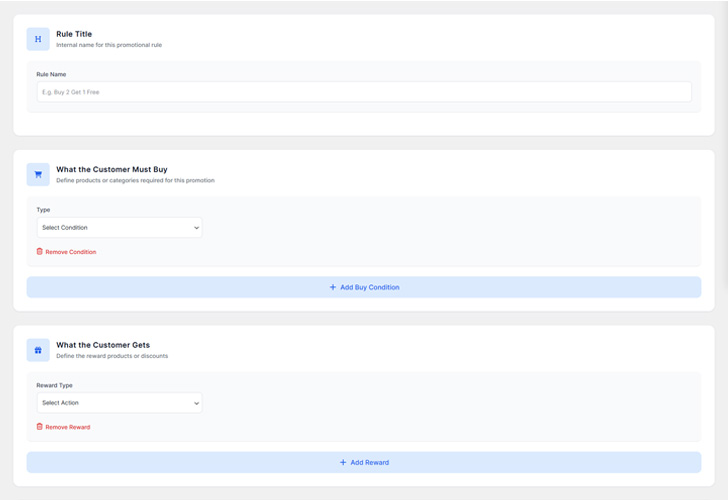

A Predictable Promotion Engine for WooCommerce
WooBoost is a rule-based promotion plugin for WooCommerce that applies BOGO rewards, free products, and discounts only when all defined conditions are met.
Each rule is evaluated with strict cart logic, ensuring paid and free items behave correctly, quantities stay in sync, and promotions remain predictable across cart and checkout.
Unlike coupon-based or auto-discount plugins, WooBoost focuses on deterministic rule execution, making it ideal for stores that need reliability rather than workarounds
Everything You Need to Build Powerful
BOGO Promotions
WooBoost includes all the essential tools to create flexible BOGO offers, free product rewards, and conditional
promotions — with full control over limits, timing, and rule priority.
Flexible BOGO Rules
Create unlimited Buy One Get One deals with customizable conditions. Set up BOGO, Buy 2 Get 1, or any combination that fits your strategy.
Scheduled Promotions
Schedule campaigns in advance with precise start and end dates. Perfect for seasonal sales, flash deals, and holiday promotions.
Advanced Targeting
Target specific products, categories, or customer segments. Create personalized offers based on purchase history and behavior.
Automatic Free Item Handling
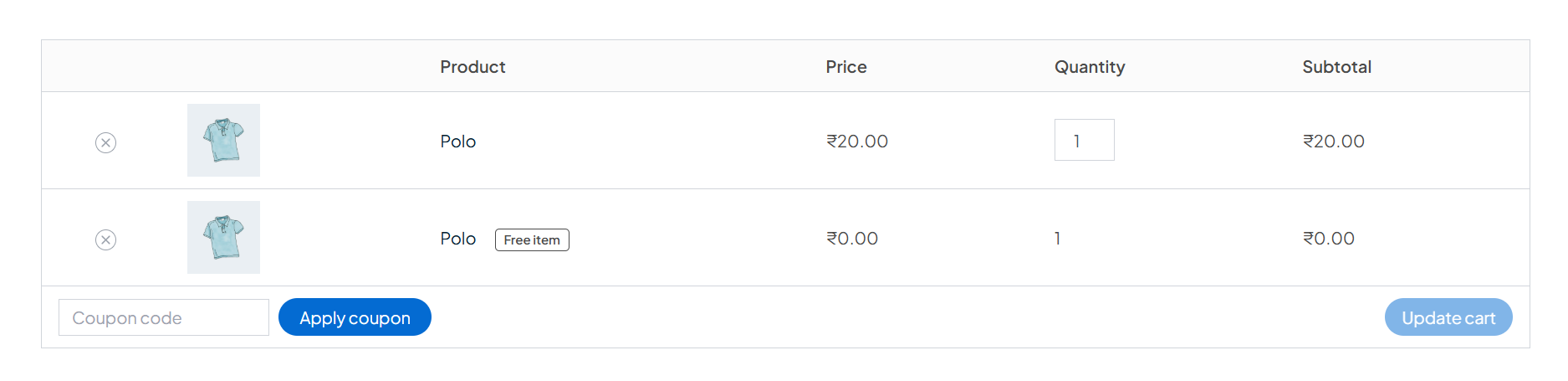
WooBoost intelligently manages free items separately from paid products to ensure correct quantities and accurate cart totals.
No Coupon Required
Apply BOGO offers automatically without coupon codes, creating a seamless shopping experience for customers.
Lightning Fast Setup
Launch your first promotion in minutes with our intuitive interface. No coding required, just select products and set your rules.
Simple Rules
Buy 1 Get 1 Free
Buy one item and get the same item free automatically.
Buy 2 Get 1 Free
Purchase two items and receive one extra item for free.
Buy X Get Y (Different Product)
Buy one product and get a different product as a free gift.
Buy X Get X (Same Product)
Buy multiple quantities and get the same product free.
Buy Product → Free Gift
Purchase a specific product and receive a free gift item.
Buy Product → Discount
Apply a discount when a specific product is added to the cart.
Buy from Category → Free Product
Purchase any product from a category to receive a free item.
Buy X from Category → Gift
Buy a minimum number of items from a category and get a gift.
Category → Cheapest Item Free
Cheapest item from the selected category becomes free.
Category Quantity Deal
Unlock rewards when buying multiple items from a category.
Category → Fixed Discount
Apply a fixed cart discount when category conditions are met.
Category → Percentage Discount
Apply a percentage discount based on category purchases.
Buy Any X Items → Free Product
Buy a minimum number of items and receive a free product.
Buy Any X Items → Cheapest Free
Cheapest product in the cart becomes free after quantity is met.
Quantity-Based Reward
Reward customers for buying a specific number of items.
Quantity-Based Discount
Apply a discount when cart quantity reaches a set value.
Quantity Rule with Limits
Limit how many times a quantity-based offer can be used.
Quantity Rule Once per Order
Apply the offer only once per order.
Cheapest Item Free (Cart)
Automatically make the lowest-priced item free in the cart.
Cheapest Free with Quantity
Cheapest item is free only after a quantity condition is met.
Category → Percentage Discount
Apply a percentage discount based on category purchases.
Cheapest Free Once per Order
Apply cheapest-free logic only one time per order.
Cheapest Free Per User
Allow each user to claim the cheapest free item once.
Cheapest Free with Exclusions
Exclude sale or free items from cheapest-item calculation.
Spend X → Get Free Product
Receive a free product when cart subtotal reaches a value.
Spend X → Cheapest Free
Cheapest item becomes free when spend threshold is met.
Spend X → Fixed Discount
Apply a fixed discount once cart total reaches a value.
Spend X → Percentage Discount
Apply a percentage discount based on cart subtotal.
Spend Range Rewards
Different rewards based on cart spend ranges.
Spend-Based Limits
Control how often spend-based rewards can apply.
Smart Rules
Buy 2 → Get 1
Reward customers with free items at specific quantities.
Buy 3 → Get 2
Offer higher rewards for larger quantity purchases.
Buy 5 → Get 3
Encourage bulk purchases with tiered rewards.
Tiered Quantity Rewards
Different rewards for different quantity levels.
Quantity + Category
Quantity-based rules limited to selected categories.
Quantity + Cheapest Free
Make the cheapest item free after quantity conditions.
Buy A + B → Get C
Combine multiple products to unlock a reward.
Buy Any X from Selected Products
Choose products and reward when any combination is bought.
Mix Products Across Categories
Allow cross-category product combinations.
Mix Variations
Combine different variations to qualify for offers.
Mix → Free Gift
Mixed product purchases trigger a free gift.
Mix → Discount
Apply discounts for mixed product purchases.
Category + Quantity
Category purchase combined with cart quantity rules.
Category + Subtotal
Category purchase combined with spend thresholds.
Category + Cheapest Free
Cheapest category item becomes free with cart rules.
Category + Discount
Apply discounts when category and cart conditions match.
Category Exclusions
Exclude specific categories from promotions.
Category Priority Rules
Control rule priority when multiple category rules apply.
Variation BOGO
Buy a specific variation and get it free.
Variation Quantity Deal
Quantity-based offers for specific variations.
Mix Variations
Combine different variations to unlock rewards.
Variation → Free Gift
Buying a variation triggers a free gift.
Variation → Discount
Apply discounts to selected variations.
Cheapest Variation Free
Cheapest variation becomes free automatically.
Cheapest Free with Conditions
Automatically apply cheapest-item logic with rules.
Cart-Based Auto Gift
System adds gifts automatically based on cart state.
Auto Reward Once per Order
Automatically limit rewards to one per order.
Auto Reward Per User
Restrict automatic rewards per customer.
Auto Reward with Exclusions
Exclude specific items from auto rewards.
Auto Reward with Limits
Control reward quantity and frequency automatically.
Advanced Rules
Tiered Spend Discounts
Apply different discounts at different spend levels.
Spend X → Y% Off
Percentage discount triggered by cart subtotal.
Spend X → Fixed Discount
Fixed discount applied at spend threshold.
Spend + Category
Spend rules combined with category conditions.
Spend + Product
Spend rules limited to specific products.
Spend Rule Priority
Control which spend rule applies first.
Product-Based Discount
Apply a discount when selected products are added to the cart.
Category-Based Discount
Apply a discount when products from specific categories are in the cart.
Quantity-Based Discount
Apply a discount when cart or product quantity reaches a threshold.
Cart Subtotal Discount
Apply a discount when the cart subtotal reaches a specific amount.
Discount with Limits
Control how many times the discount can be applied per order or user.
Discount with Exclusions
Exclude sale items or free products from triggering the discount.
Logged-in Users Only
Restrict promotions to logged-in customers.
First Order Only
Apply promotions only on first purchase.
Per-User Usage Limit
Limit how many times a user can use the rule.
Role-Based Eligibility
Enable rules for specific user roles.
Exclude Sale Items
Prevent discounts on already-discounted products.
Exclude Free Products
Prevent free items from triggering rules.
Repeatable Rule
Allow the rule to apply multiple times based on cart quantity.
Example:
Buy 2 Get 1 → applies twice when buying 4 items.
Reward Apply Limit
Limit how many free items or rewards can be added by the rule.
Example:
Buy X Get Y → maximum 2 free items per order.
Once per Order
Apply the rule only once per cart, even if conditions are met multiple times.
Example:
Buy 2 Get 1 → applied only once, no matter cart quantity.
Start & End Date
Run promotions within a fixed time range.
Day-Based Rules
Enable rules on specific days.
Time-Based Rules
Enable promotions during specific hours.
Flash Sales
Short-term, high-impact promotions.
Scheduled BOGO
Automatically start and stop BOGO offers.
Auto-Expire Rules
Automatically disable rules after expiry.
Create Powerful BOGO Rules in Four
Simple Steps
are satisfied
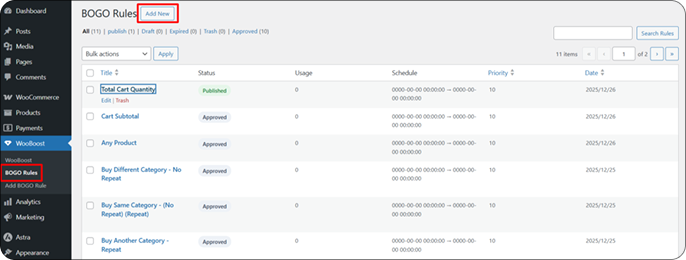
Create a Rule
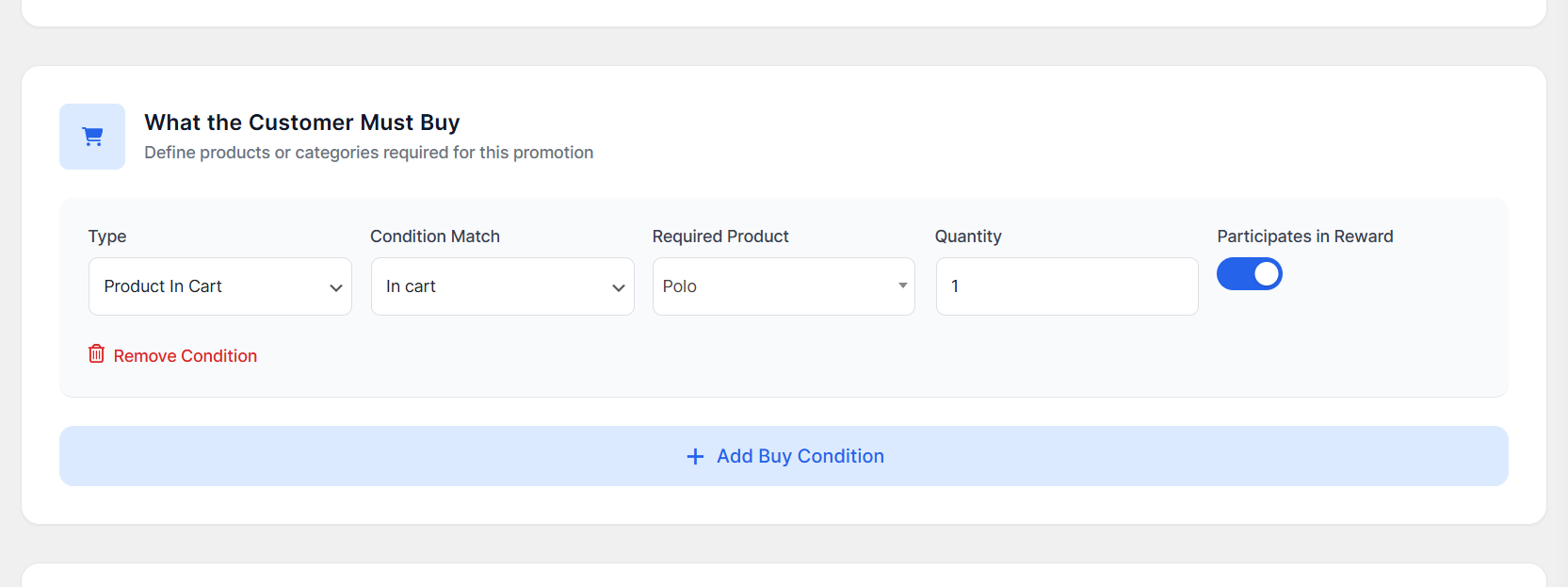
Define Conditions
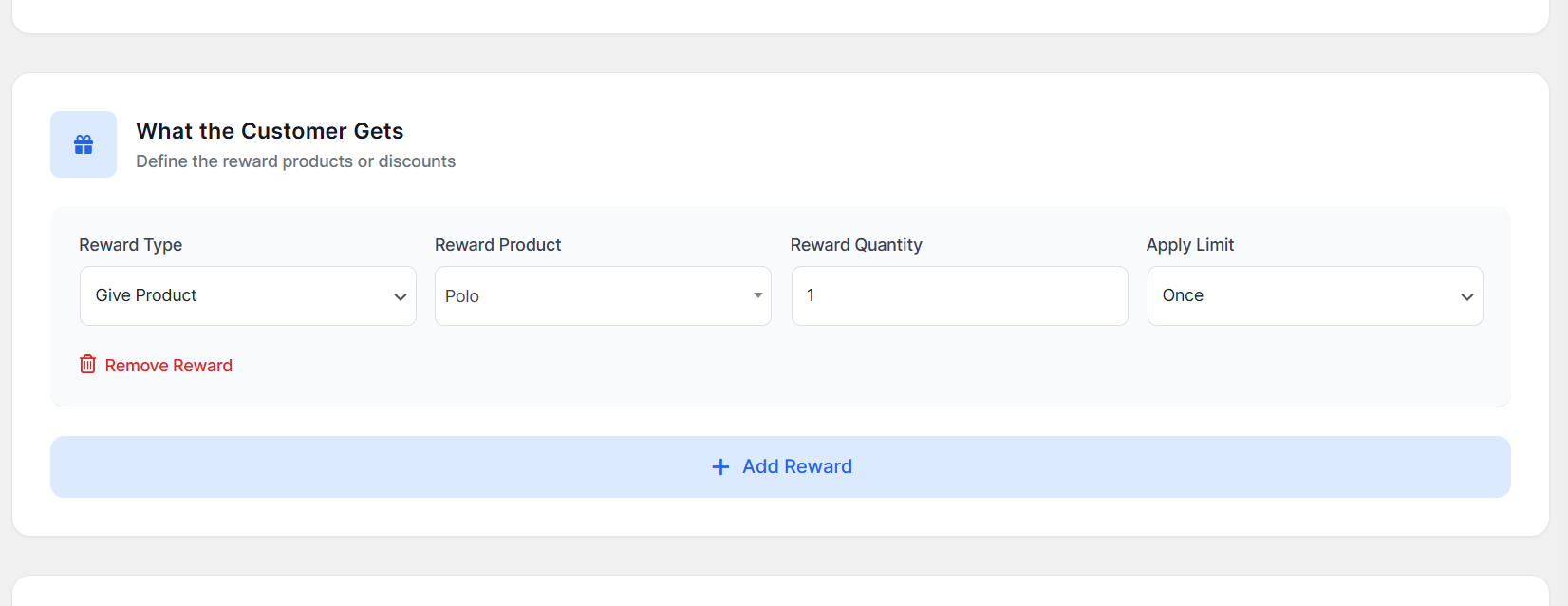
Select an Action:
Automatic Application:
Predictable Rule Execution with
Full Priority Control
are executed based on their defined priority, ensuring predictable results even when multiple promotions apply at
the same time.
Step 1: Rule Evaluation
Products, categories, variationsQuantity or cart subtotalDate, usage limits, exclusions user-specific conditions
Step 2: Priority Sorting
All rules are checked together Every active rule is evaluated Conditions are validated independently No rule blocks anothe
Step 3: Sequential Application
Rewards applied in priority order Free products added Discounts applied Multiple promotions can run together
Clear Documentation & Professional Support
need assistance, professional support is available through Envato to ensure smooth setup and usage.
Clear Documentation
- Step-by-step setup guides
- Real demo rule examples
- Best practices for promotions
Professional Support
- Professional assistance via Envato
- Issue tracking and timely responses
- Ongoing updates and maintenance
Frequently Asked Questions
WooBoost includes clear, well-structured documentation with real examples to help you get started quickly. If you
need assistance, professional support is available through Envato to ensure smooth setup and usage.
01Can multiple BOGO rules apply at the same time?
Yes. Multiple BOGO rules can apply at the same time as long as their conditions are met.
WooBoost evaluates rules based on priority and eligibility, ensuring predictable and conflict-free behavior.
02How does WooBoost handle paid and free items?
WooBoost treats paid and free items separately under the hood.
This guarantees:
Correct quantities
Clear pricing
No accidental discounts on paid items
Resulting in reliable and predictable cart behavior.
03Can I limit how many times a rule applies?
Yes. You can fully control rule usage by setting:
Per-order limits
Per-user limits
Repeatable or one-time application
This allows you to prevent abuse and fine-tune promotions.
04Do I need to use coupons?
No. WooBoost works automatically without requiring coupons.
Rules are applied instantly when conditions are met — no coupon codes needed.
05Will this affect site performance?
No. WooBoost is optimized for performance and evaluates rules efficiently.
It runs only when needed (cart updates, checkout), ensuring minimal impact on page load and site speed.